mirror of
https://github.com/fabioformosa/quartz-manager.git
synced 2026-05-21 09:10:30 +09:00

quartz-manager
GUI Manager for Quartz Scheduler
SCREENSHOT
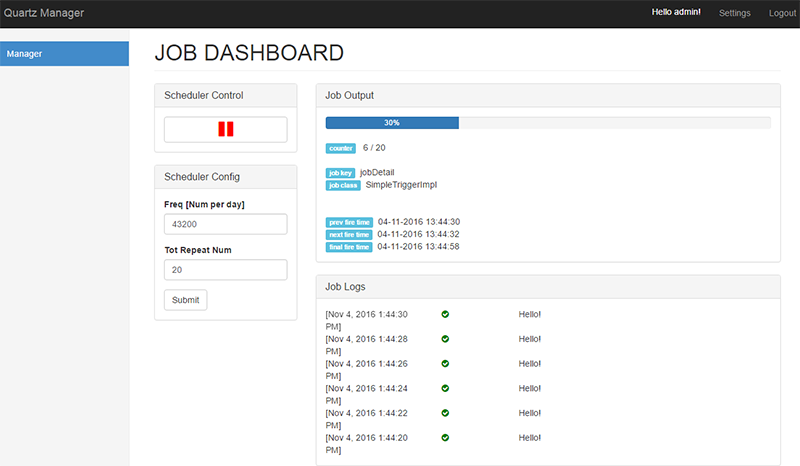
HOW IT WORKS
- Set up the trigger into the left sidebar in terms of: daily frequency and and max occurrences.
- Press the start button
- The GUI manager updates the progress bar and reports all logs of your quartz job.
HOW IT RUNS
- Quartz-Manager is a Spring Boot Application. To run by CLI
mvn spring-boot:runor through your IDE. For more details spring boot ref. - Open quartz-manager at the link: http://localhost:9000/quartz-manager/manager
- Log in with default credentials:
admin/admin
HOW RUN YOUR JOB
By default, quartz-manager executes the dummy job that logs "hello world!".
Replace the dummy job (class: it.fabioformosa.quartzmanager.jobs.SampleJob) with yours. Follow these steps:
- Let extend the super class
it.fabioformosa.quartzmanager.jobs.AbstractLoggingJob - Change the scheduler settings, providing the class name of your job. Open class
it.fabioformosa.quartzmanager.configuration.SchedulerConfigand for the methodjobDetailreplace SampleJob.class with YourJob.class
HOW CHANGE SETTINGS
- Num of Threads:
/quartz-manager/src/main/resources/quartz.properties - Credentials:
it.fabioformosa.quartzmanager.configuration.WebSecurityConfig - Server context path (default
/quartz-manager) and port (default9000):/quartz-manager/src/main/resources/application.properties
Tech Overview
Backend Stack Java 8, Spring Boot 1.3.2 (Spring MVC 4.2.4, Spring Security 4.0.3), Quartz Scheduler 2.2.2
Application Server Tomcat (embedded)
Frontend Angularjs 1.5.0, Thymeleaf 2.1.4, Web-Socket (sockjs 0.3.4, stompjs)
Style Bootstrap 3.3.4