
124 lines
5.7 KiB
Markdown
124 lines
5.7 KiB
Markdown
# Event-Sourcing+CQRS example application
|
|
|
|
This example application is the money transfer application described in my talk [Building and deploying microservices with event sourcing, CQRS and Docker](http://plainoldobjects.com/presentations/building-and-deploying-microservices-with-event-sourcing-cqrs-and-docker/).
|
|
This talk describes a way of architecting highly scalable and available applications that is based on microservices, polyglot persistence,
|
|
event sourcing (ES) and command query responsibility segregation (CQRS).
|
|
Applications consist of loosely coupled components that communicate using events.
|
|
These components can be deployed either as separate services or packaged as a monolithic application for simplified development and testing.
|
|
|
|
# Built using the Eventuate platform
|
|
|
|
<a href="http://eventuate.io"><img src="http://eventuate.io/i/logo.gif"> </a>
|
|
|
|
Read the <a href="http://eventuate.io">overview</a> or look at the other <a href="http://eventuate.io/exampleapps.html">example applications</a>.
|
|
|
|
# Big ideas
|
|
|
|
This example illustrates several important concepts:
|
|
|
|
* How to decompose an application into microservices - as described below the application consists of several services.
|
|
For example, bank accounts are managed by one service, money transfers by another service.
|
|
|
|
* Using an event-driven architecture to achieve data consistency - rather than using traditional distributed transaction to maintain database consistency this application uses an eventually consistent, event-driven approach.
|
|
|
|
* Using event sourcing to implement the event-driven architecture - the domain logic consists of Domain-Driven Design (DDD) aggregates that using event sourcing.
|
|
|
|
* Using Command Query Responsibility Segregation (CQRS) - update requests (HTTP POSTs and PUTs) and view requests (HTTP GETs) are handled by separate services.
|
|
|
|
* How event sourcing enables deployment flexibility - the application can either be deployed as a monolith or as microservices.
|
|
|
|
# About the example application
|
|
|
|
This example application provides a REST API for creating and viewing bank accounts and transferring money between them.
|
|
|
|
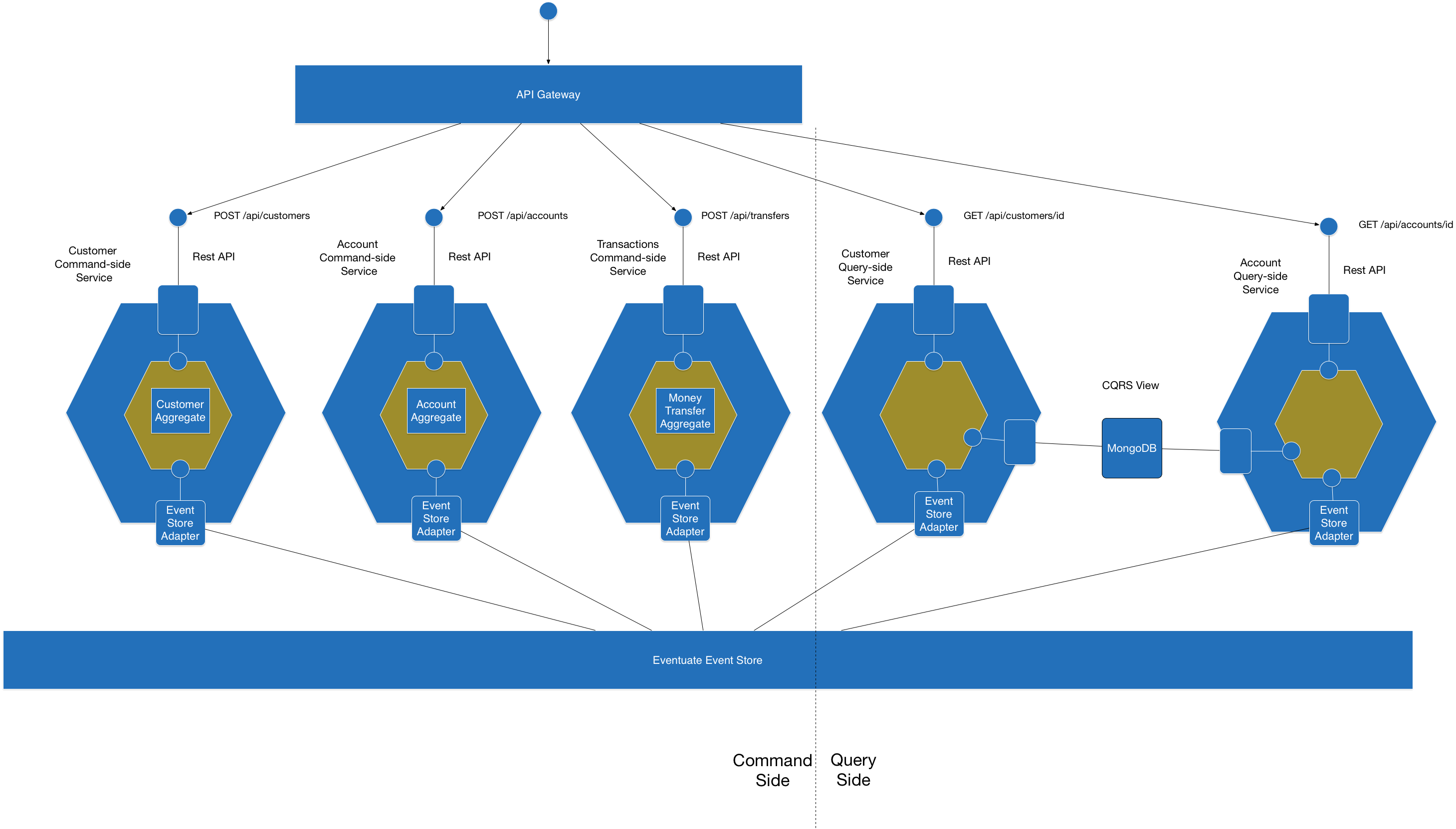
The following diagram shows the architecture:
|
|
|
|
|
|
|
|
There are the following services:
|
|
|
|
* Customers Service - REST API for creating customers
|
|
* Accounts Service - REST API for creating accounts
|
|
* Transactions Service - REST API for transferring money
|
|
* Customers View Service - subscribes to events and updates a MongoDB View, and provides an API for retrieving customers
|
|
* Accounts View Service - subscribes to events and updates a MongoDB View, and provides an API for retrieving accounts
|
|
|
|
There is also an [API gateway](http://microservices.io/patterns/apigateway.html) service that acts as a Facade in front of the services.
|
|
|
|
# About the examples
|
|
|
|
There are currently the following versions of the example application:
|
|
|
|
* java-spring - a Java and Spring Boot example
|
|
* scala-spring - a Scala and Spring Boot example (NOTE: this version is lagging the Java Spring and hasn't been updated in a longtime.)
|
|
|
|
Other examples will be added shortly including a Scala/Play example.
|
|
|
|
For more information, please see the [wiki](../../wiki)
|
|
|
|
# About the Eventuate Platform
|
|
|
|
The application is built using [Eventuate](http://eventuate.io/), which is an application platform for writing transactional microservices.
|
|
It provides a simple yet powerful event-driven programming model that is based on event sourcing and Command Query Responsibility Segregation (CQRS).
|
|
Eventuate solves the distributed data management problems inherent in a microservice architecture.
|
|
It consists of a scalable, distributed event store and client libraries for various languages and frameworks including Java, Scala, and the Spring framework.
|
|
|
|
There are two versions of Eventuate:
|
|
|
|
* [Eventuate SaaS server](http://eventuate.io/usingeventuate.html) - this is a full featured event store that is hosted on AWS
|
|
* [Eventuate Local](http://eventuate.io/usingeventuate.html) - an open-source event store that is built using MySQL and Kafka
|
|
|
|
There is also an embedded test event store, which is great for integration tests.
|
|
|
|
# Building and running the microservices
|
|
|
|
This is a Gradle project.
|
|
However, you do not need to install Gradle since it will be downloaded automatically.
|
|
You just need to have Java 8 installed.
|
|
|
|
The details of how to build and run the services depend slightly on whether you are using Eventuate SaaS or Eventuate Local.
|
|
|
|
## Building and running using Eventuate SaaS
|
|
|
|
First, must [sign up to get your credentials](https://signup.eventuate.io/) in order to get free access to the SaaS version.
|
|
|
|
Next, build the application
|
|
|
|
```
|
|
cd java-spring
|
|
./gradlew assemble
|
|
```
|
|
|
|
Next, you can launch the services using [Docker Compose](https://docs.docker.com/compose/):
|
|
|
|
```
|
|
docker-compose up -d
|
|
```
|
|
|
|
Finally, you can open the home page, which is served up by the API Gateway: `http://$DOCKER_HOST_IP:8080`
|
|
|
|
Note: `DOCKER_HOST_IP` is the IP address of the machine where Docker is running, e.g. the IP address of the VirtualBox VM.
|
|
|
|
## Building and running using Eventuate Local
|
|
|
|
First, build the application
|
|
|
|
```
|
|
cd java-spring
|
|
./gradlew assemble -P eventuateDriver=local
|
|
```
|
|
|
|
Next, launch the services using [Docker Compose](https://docs.docker.com/compose/):
|
|
|
|
```
|
|
export DOCKER_HOST_IP=...
|
|
docker-compose -f docker-compose-eventuate-local.yml up -d
|
|
```
|
|
|
|
Note: You need to set `DOCKER_HOST_IP` before running Docker Compose.
|
|
This must be an IP address or resolvable hostname.
|
|
It cannot be `localhost`.
|
|
See this [guide to setting `DOCKER_HOST_IP`](http://eventuate.io/docs/usingdocker.html) for more information.
|
|
|
|
Finally, you can open the home page, which is served up by the API Gateway: `http://$DOCKER_HOST_IP:8080`
|