
62 lines
2.8 KiB
Markdown
62 lines
2.8 KiB
Markdown
# View 환경설정
|
|
|
|
---
|
|
|
|
## Welcome Page 만들기
|
|
- `Welcome Page` : 도메인만 누르고 들어왔을 때 첫 화면이다.
|
|
- `main/resources/static` 디렉토리 내에 `index.html` 파일을 만들면 `static/index.html`이 `Welcome Page`기능을 제공한다.
|
|
|
|
---
|
|
|
|
## spring
|
|
- 스프링은 자바 엔터프라이즈 웹 애플리케이션 관계된 전반적인 생태계를 다 제공한다.
|
|
- 따라서 필요한 것을 찾는 것이 중요하다.
|
|
- [스프링 공식 홈페이지](spring.io)(`spring.io`) -> `Projects` -> `Spring Boot` -> `LEARN` -> `Reference Doc.` -> 필요한 정보에 대한 문서 검색(`index.html`을 검색해보자)
|
|
|
|
---
|
|
|
|
## 참고할 수 있는 링크
|
|
- [thymeleaf 공식사이트](https://www.thymeleaf.org/)
|
|
- [스프링 공식 튜토리얼](https://spring.io/guides/gs/serving-web-content/)
|
|
- [스프링 부트 메뉴얼](https://docs.spring.io/spring-boot/docs/2.3.1.RELEASE/reference/html/spring-boot-features.html#boot-features-spring-mvc-template-engines)
|
|
|
|
---
|
|
|
|
## Controller
|
|
- `@Controller` 어노테이션을 명시해야 한다.
|
|
|
|
---
|
|
|
|
## @GetMapping("경로")
|
|
- 웹 어플리케이션에서 지정한 경로로 들어오면 해당 메서드를 호출한다.
|
|
|
|
---
|
|
|
|
## hello.html
|
|
|
|
- `th` : `thymeleaf`의 `th`이다.
|
|
- `thymeleaf` 템플릿 엔진 : `<html xmlns:th="http://www.thymeleaf.org">`
|
|
- `html` 내에 작성해주면 템플릿 엔진으로써 `thymeleaf` 문법을 사용할 수 있다.
|
|
- `${data}` : `HelloController`에서 `model`의 키 값으로 준 `data`이고, 값은 마찬가지로 `model`의 `value`를 사용하여 치환되어 웹에서 표시된다.
|
|
|
|
---
|
|
|
|
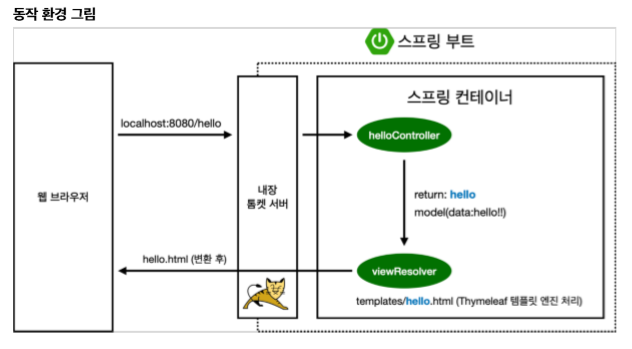
## 동작 환경 그림
|
|
|
|
|
|
- 웹 브라우저에서 `hello`로 접근하면 내장 톰캣 서버가 `HelloController`에 존재하는 `hello` url이 매핑되어 있는 `hello` 메서드를 찾아서 실행시킨다.
|
|
- 이때 `model`에 키는 `data`, 값은 `hello!!`로 넣는다.
|
|
- 그리고 `hello`(`resources`에 존재하는 `hello`)를 리턴한다.
|
|
- 이것은 `resources/templates/hello`에 접근해서 랜더링(저 화면을 실행시켜라)하라는 의미이다.
|
|
- 컨트롤러에서 리턴 값으로 문자를 반환하면 `뷰 리졸버(viewResolver)`가 화면을 찾아서 처리한다.
|
|
- 스프링부트는 템플릿엔진은 기본적으로 `viewName` 매핑을 한다.
|
|
- `resources/templates/` + `ViewName` + `.html`과 매핑시켜준다.
|
|
- 결과적으로, `resources/templates/hello.html`이 열리게 된다.
|
|
|
|
---
|
|
|
|
## 참고
|
|
- `spring-boot-devtools` 라이브러리를 추가하면 `html` 파일을 컴파일만 해주면 서버 재시작 없이 `View` 파일 변경이 가능하다.
|
|
- 인텔리제이 컴파일 방법: 메뉴 `build` -> `Recompile`
|
|
|
|
--- |